
Bangladeshi iPhone users often feel stuck when searching for an ios betting web app bangladesh guide. Android friends share direct APK links, yet tapping an .apk file inside iOS simply shows a blank download prompt. Worse, random Telegram channels push shady "iOS Direct App" links requiring device management certificates. Understanding Apple's security model reveals a much cleaner, zero-risk solution built straight into Safari.
Why iPhones reject APKs and hide betting apps in BD App Store
Some frustrated users try switching their Apple ID region to another country just to search App Store listings. That shortcut creates messy billing conflicts with Bangladeshi cards and still fails to surface BDT-native local lobbies. Most Bangladesh-focused platforms prioritize mobile WebKit design instead of fighting global App Store bans.
Fortunately, modern iOS 15+ and iOS 18 Safari engines support Progressive Web Apps, known on iPhones as Web Clips. When pinned properly, a Web Clip launches full-screen without Safari address bars, retains your Face ID login autofill, and executes every HTML5 slot and live dealer table smoothly.
The hidden privacy danger of third-party enterprise profiles
Enterprise certificates exist so large corporations can deploy private internal tools to company employees. Scammers and grey-market aggregators abuse leaked corporate certificates to distribute unvetted gambling wrappers outside the App Store. Accepting that trust prompt hands sweeping system privileges to whoever signed the bundle.
Installing an Enterprise Developer profile or .mobileconfig file gives a safer, faster official iPhone casino app than Safari.
Enterprise profiles bypass App Store vetting, expire abruptly when Apple revokes the certificate, and can intercept device network traffic. A Safari PWA runs strictly inside Apple's encrypted WebKit sandbox.
If you previously installed an unknown configuration profile from a random download page, open iPhone Settings, tap General, choose VPN & Device Management, and remove any unfamiliar profile immediately.
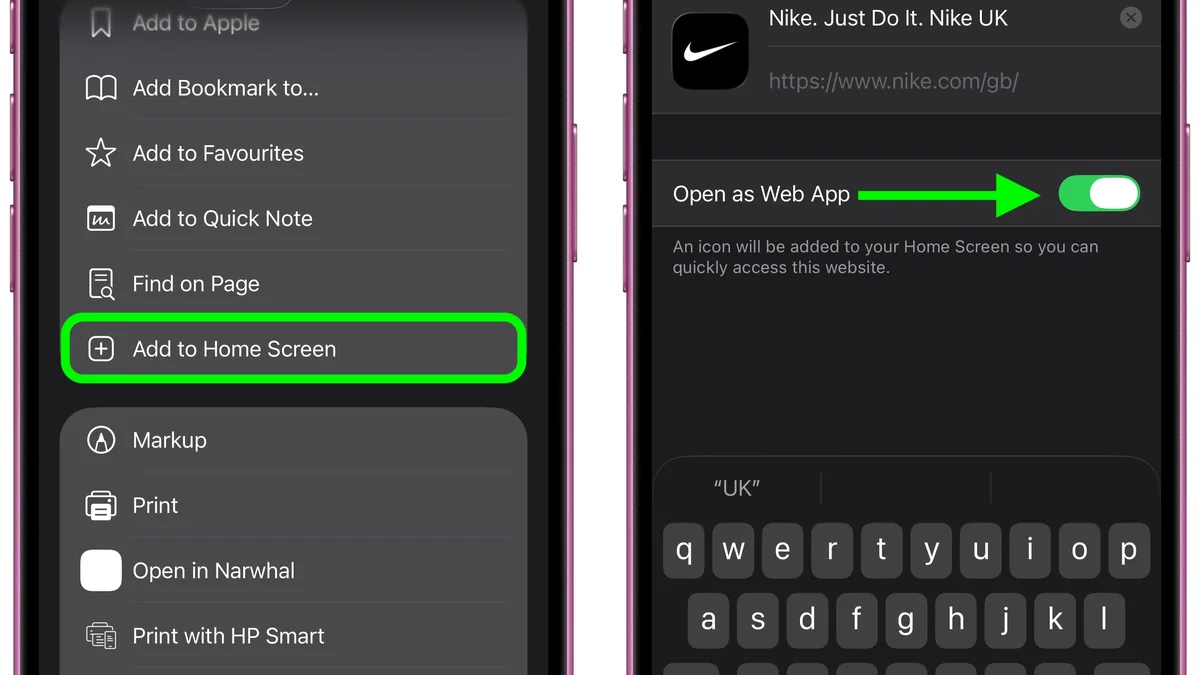
Step-by-step Safari Add to Home Screen setup on iOS 15+
- 1Open the official HTTPS link inside Safari: Copy the verified portal address from your bookmark and launch it in Apple Safari, checking for the security padlock.
- 2Tap the bottom Share square-and-arrow icon: Locate the blue Share button centered along Safari's bottom toolbar (or top right on iPad).
- 3Scroll down and tap Add to Home Screen: Look for the square plus icon inside the Share sheet menu.
- 4Confirm the app title and domain path: Keep the shortcut name brief, verify the displayed domain matches cleanly, and tap Add in the top right corner.
- 5Launch directly from your iPhone Home Screen: Tap the newly created icon to open a clean app-style window protected by iOS WebKit isolation and Face ID Keychain autofill.
Comparing Safari Web Clip PWAs against enterprise IPA wrappers
Review how Apple's native Web Clip architecture compares against unofficial enterprise IPA sideloads across every security and usability factor that matters in Bangladesh.
| Comparison Factor | Safari Home Screen PWA | Unofficial Enterprise IPA |
|---|---|---|
| iOS Sandbox Protection. | Full WebKit isolation enforced. | Bypasses standard store review. |
| Certificate Revocation Risk. | Zero — never expires randomly. | High — app crashes upon revocation. |
| iPhone Storage Footprint. | Under 5 MB cache footprint. | 60 MB to 150 MB binary storage. |
| Lobby & Odds Updates. | Automatic silent web refresh. | Manual re-download required. |
| Face ID Keychain Autofill. | Supported natively via Safari. | Often broken or insecure storage. |
| bKash & Nagad App Handoff. | Clean iOS app switcher support. | Frequent deep-link freeze issues. |
Every game studio—from JILI Super Ace to Evolution Crazy Time—runs natively inside iOS Safari's WebGL and WebRTC video layers. Nothing in the paytable, bonus rollover, or RTP changes when launching through a Web Clip instead of a binary app.
Optimizing iPhone Face ID, Safari cookies, and bKash transfers
Three practical iPhone tweaks prevent almost every common iOS cashier error during deposits and withdrawals:
- Use standard Safari tabs for your Web Clip: Pin the Home Screen icon from a normal Safari session so iCloud Keychain saves your strong password behind Face ID biometrics.
- Leave "Prevent Cross-Site Tracking" enabled safely: Modern cashiers work cleanly without disabling core privacy guards, though aggressive third-party ad-blocking extensions can occasionally hide payment confirmation pop-ups.
- Keep Low Power Mode off during live video: iOS Low Power Mode throttles WebRTC frame rates and dims screen refresh rates, causing choppy Evolution wheel spins on 4G.
- Switch smoothly between Safari PWA and bKash: Copy the exact BDT agent wallet number, swipe up to open the bKash app, send the exact Taka sum, copy the TrxID, and swipe right back to the PWA icon.
Cross-checking security and bonus rules on iOS
Apple removes unverified real-money gambling apps from the Bangladesh App Store strictly. Because no legitimate local App Store listing exists, fake lookalike utility apps and risky enterprise certificates frequently circulate online. Never approve unknown profiles inside Settings > General > VPN & Device Management just to mimic a native app icon.
An enterprise provisioning profile grants deep system visibility far beyond a normal browser tab. By contrast, a Safari Home Screen Web Clip stays locked inside Apple's strict WebKit sandbox. It cannot touch your Contacts, Photos, SMS banking alerts, or bKash PIN prompts.
Fixing frozen Safari caches and enabling Face ID smoothly
- Clear stale PWA storage cleanly: If live odds freeze after a platform update, open Settings > Safari > Advanced > Website Data. Search the domain name and swipe left to remove cached scripts, then reopen your shortcut.
- Use native Keychain Autofill: Save your verified login inside Apple Passwords rather than sticky notes. Face ID unlocks your lobby in one glance without exposing raw credentials to keyboard extensions.
- Disable Background App Refresh on heavy socials: Keeping Safari responsive on 64 GB iPhones helps during live dealer handovers. Free memory prevents sudden WebGL tab reloads mid-spin.
- Switch off Low Power Mode during live dealers: Apple throttles WebKit frame rates heavily below 20% battery. Plug in or pause battery saver before entering fast baccarat shoes.
Always verify your account credentials before saving anything inside iCloud Keychain. If someone in your household uses Android alongside your iPhone, share our Android APK sideloading guide rather than guessing device settings.
On cellular packs from Grameenphone or Robi, pair your Safari PWA with our low-data 4G bandwidth checklist so live streams stay crisp without burning megabytes. You can also review Nagad BDT banking rules, study welcome bonus turnover math, or explore the Mobile Apps Hub.
Pin your clean iPhone web app in seconds
Skip risky enterprise profiles, follow Safari's native Web Clip steps above, and review bKash deposit rules or bonus rollover math before staking BDT.
18+Responsible gaming and player safeguards
Online casino games and cricket wagering are strictly restricted to adults aged 18 years and older. Treat every BDT deposit as discretionary entertainment spending rather than household income or debt recovery.
Protect iPhone sessions behind Face ID or Touch ID so shared household access never exposes your BDT wallet.
- Pre-session deposit caps: Lock a daily or weekly BDT limit in your account settings before starting any session; limit increases typically carry a mandatory cooling-off period.
- 24-hour self-exclusion: Account cool-off and self-exclusion tools apply across mobile browser, Android APK, and desktop logins within 24 hours of request.
- Confidential international support: Reach free, private guidance through GambleAware, GamCare, or Gambling Therapy.
Read our complete Bangladesh responsible gaming & self-exclusion guide before funding your wallet.
Frequently asked questions
These verified People Also Ask answers reflect live Bangladesh search questions and factual cashier, RTP, and compliance rules verified for iOS betting web app guide: Safari Add-to-Home-Screen PWA setup.
Why can I not install a casino APK file on my iPhone in Bangladesh?
Android .apk packages only work on Android operating systems. Apple iOS requires App Store binaries or browser-based Progressive Web Apps, so Safari's Add to Home Screen feature is the proper setup path.
Are third-party iOS enterprise profiles safe to trust for betting apps?
No. Unverified Enterprise Developer profiles and .mobileconfig files bypass Apple's App Store vetting, expose network privacy, and stop working abruptly whenever Apple revokes the underlying corporate certificate.
Why is the Add to Home Screen option missing when I open a link from Facebook or Telegram?
In-app mini browsers inside Facebook, Messenger, and Telegram hide Safari's PWA features. Tap the open-in-Safari compass icon first, then tap the Share square to pin your Web Clip.
Does a Safari Web Clip PWA support Face ID login and bKash deposits?
Yes. When pinned from a standard Safari tab, your Web Clip supports iCloud Keychain Face ID autofill and lets you switch smoothly between your pinned lobby and the bKash or Nagad app.
How much storage space does an iOS Safari PWA take on my iPhone?
Less than 5 MB for cached shortcut icons and layout files, compared to 60 MB to 150 MB for bloated third-party binary wrappers.